
Capital One Mobile review
 Analysis by GetAllApps
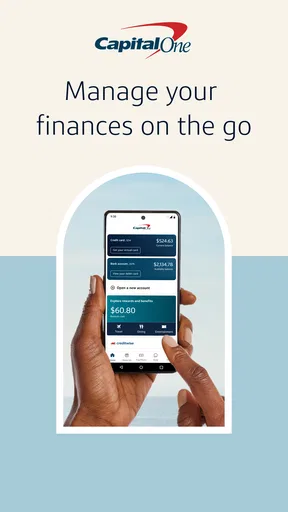
I would choose a banking app based on the jobs I actually need it to handle, not on how many buttons it puts on screen. For me, the useful test is whether routine tasks—checking an account, paying a bill, or dealing with a misplaced card—can be done without turning into a visit to a branch or a search through several menus. Capital One Mobile is built around that kind of day-to-day account management, so it makes the most sense for people who already bank with Capital One and want their banking close at hand.
It is a free finance app from Capital One Services, LLC, and its core appeal is practical rather than flashy. You can use it for bill payments, check deposits and card locking, alongside the usual account-management tasks. If you are deciding whether to install it, the key question is less “Is this the best banking app for everyone?” and more “Will it make managing my Capital One accounts easier?”
Choose it for the banking you already do
A mobile banking app is most valuable when it fits the accounts and habits you already have. If your cards or accounts are with Capital One, putting everyday actions in one place can cut down on small errands: you can check a balance when planning a purchase, make a payment when a bill is due, or lock a card if you cannot find it. If you do not use Capital One, the app is unlikely to be a compelling reason on its own to change your banking relationship.
The app has been available since July 29, 2011, and its current version is 6.55.5. It has a 4.5 average from around 1.7 million ratings, with over 50 million installs. Those figures suggest broad adoption, but they cannot tell you whether the app suits your particular accounts or whether its layout matches your preferences. I would treat them as context, not as a substitute for checking that your own Capital One products are supported in the app.
One useful decision point is how often you handle routine banking away from a computer. If you mostly need to review activity and take occasional action, a bank’s app can be a straightforward companion. If you regularly manage money across several institutions, you may care more about a consolidated view than about having a polished app for just one bank. In that case, a multi-bank finance tool may fit your workflow better, though it will not replace the bank’s own controls for tasks such as locking a Capital One card.
Where everyday convenience matters
The strongest case for Capital One Mobile is the way its practical tools support a quick response. Card locking is a good example. If you reach for your card at a checkout and realize it is not in your wallet, being able to lock it in the app can give you a useful immediate step while you look for it. It is a different kind of convenience from simply viewing a balance: it helps you act when something has gone wrong.
That does not mean a card lock should be treated as a complete fraud-resolution process. I would use it as a first response to a missing card, then follow the bank’s instructions for reporting or replacing the card if it turns out to be lost. The app is handy because it puts a control within reach, but the sensible next step still depends on what happened and what Capital One advises.
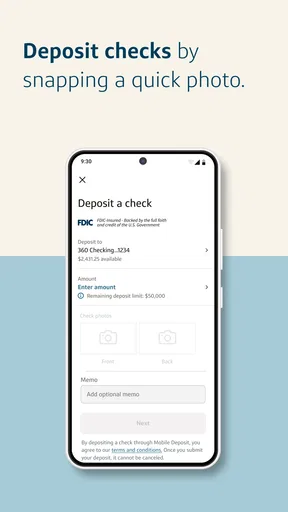
Mobile check deposit is another feature that can save a trip when you receive a paper check and have access to the deposit option for your account. A practical tip is to set aside a moment to capture the check carefully rather than rushing through the process in poor light or while distracted. Mobile deposits depend on clear images and account-specific eligibility, so it is worth checking the app’s instructions and confirming the deposit afterward rather than assuming that taking a photo means the money is immediately available.
Bill pay can also be useful as a small piece of household organization. For example, if you are reviewing your account after payday and notice a recurring bill coming up, handling it from the same banking app may be simpler than switching to another service. I would still keep an eye on due dates and payment status, especially for a first payment or a bill with a late-payment consequence. Convenience is not the same as a guarantee that every biller, timing, or payment arrangement works identically.
How it fits into a normal week
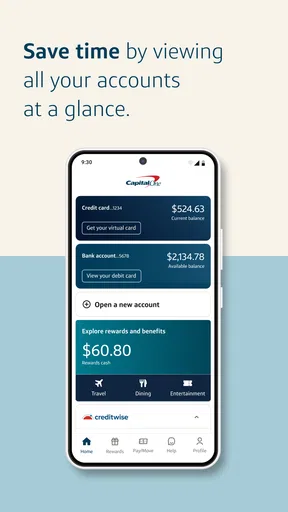
Imagine you are out running errands and want to check whether a planned purchase fits your budget. You open the app to review your account, then notice a bill that needs attention. Later, you discover your card is missing from your bag. Being able to move from checking finances to paying a bill and taking a card-protection step in one bank app is a coherent workflow. That is the kind of everyday sequence where a dedicated banking app earns its place.
A less obvious benefit is reducing the number of separate places you need to remember for bank-specific tasks. A budgeting app may help you understand spending across accounts, but it typically is not the place I would expect to go first to control a particular bank card or make a deposit into that bank account. Keeping those actions in Capital One’s own app gives you a direct route to the institution handling the account. For many people, that division—bank app for account actions, budgeting tool for broader analysis—is more useful than trying to make one app do everything.
There is a trade-off, though: an app centered on one bank is naturally less useful as a single dashboard for money held elsewhere. If your financial life is spread across several providers, you may still need other apps or a computer to get the whole picture. The best setup may be a combination, with Capital One Mobile handling Capital One tasks and a separate tool helping you compare wider spending.
What to expect from the experience
Capital One Mobile is aimed at ordinary account management, not at replacing every part of your financial planning. Its store summary highlights bill pay, card locking and check deposit, which gives a fair sense of its practical focus. I would approach it as a place to handle banking tasks rather than assume it will provide the same kind of detailed cross-bank budgeting or financial coaching that a specialist finance app might offer.
Access also depends on your device. The current app requires iOS 11 or later, so an older Apple device that cannot meet that requirement will need another way to manage the account. The content rating is Everyone, and the app is free to download. Free access makes it easy to try, but it does not remove the need to consider whether you are comfortable doing banking on your phone and keeping your device secured with the protections available to you.
For a useful first session, I would avoid trying to set up every possible task at once. Sign in, identify the accounts and cards you expect to manage, and locate the controls you would need in a hurry. Then, if you plan to use bill pay or check deposit, review the on-screen steps before relying on them for a deadline. This is a modest bit of preparation, but it makes an app much more useful when you need it quickly.
When another kind of app is the better fit
If your main goal is to compare spending across several banks, a finance organizer designed around multiple accounts may be a better starting point. Such tools address a different problem from a bank’s own app: they help you see a broader financial picture, while Capital One Mobile is the direct route for Capital One account tasks. I would not replace a bank app with a general-purpose tracker if you need to manage a card or deposit a check; equally, I would not expect a single-bank app to be the most convenient place to inspect every account you own.
If you rarely use a smartphone for banking, the app may not change much for you. A website or in-person support may feel more comfortable for complex matters, and some people prefer the larger screen when reviewing detailed account information. The app is most persuasive when you value quick access to routine actions, not when you want to move every financial conversation onto a phone.
It may also be the wrong choice if you are considering it solely because of its popularity. A large user base and a strong average rating can be reassuring, but neither proves that it supports your specific account needs or that you will like its workflow. Before making it your main route to banking, check that the Capital One accounts and services you rely on are available to you through the app.
Switching is easy to try, but habits still matter
Because the app is free, trying it does not require a purchase. The more meaningful cost is changing how you manage your money. If you currently rely on a computer, paper reminders or another banking app, you will need to build a new habit of checking the Capital One app for the tasks you move there. I would start with one recurring action—such as reviewing activity or paying a bill—rather than changing every routine in a single day.
There is little reason to abandon a multi-bank organizer if it serves your wider needs. Instead, decide which app should handle which job. Use the Capital One app for actions tied to Capital One, and keep a broader tool if it helps you track accounts elsewhere. This approach avoids the false choice between a bank app and a financial overview app; they can solve different problems.
Security habits matter as much as the app choice. Keep your phone protected, avoid signing in on a device you do not trust, and use the bank’s own guidance if you suspect a card or account has been compromised. A convenient card control is helpful, but it does not replace careful account monitoring or direct contact with the bank when an issue needs attention.
My recommendation
I recommend Capital One Mobile to existing Capital One customers who want everyday banking tasks within reach. Its combination of bill payment, check deposit and card locking gives it clear practical value, especially for someone who handles routine money management while away from a desk. The app is free, has an Everyone age rating, and is backed by a long-running product with broad adoption, but those points should support—not decide—your choice.
I would skip it as a primary finance app if you need one place to manage accounts from many banks, or if you do not have Capital One accounts to manage. For those situations, a multi-institution finance tool, a different bank’s app, or a larger-screen option may fit better. If you are already a Capital One customer, though, it is a sensible app to try: start with the tasks you use most, confirm the options available for your accounts, and keep a separate overview tool if your finances extend beyond one bank.
Pros and cons
Pros
- Biometric sign-in makes account access quick and convenient.
- Card controls let you lock a misplaced card from the app.
- Transaction alerts help you spot unfamiliar purchases sooner.
- In-app chat provides a direct way to contact customer support.
- CreditWise offers free credit monitoring for eligible users.
Cons
- Some features are available only to Capital One customers.
- Mobile check deposit requires a supported account and endorsement.
- Account details may take time to update after transactions.
- Certain account tasks may still require a call or website visit.
- App performance can vary depending on your device and connection.


